
Download Text Editor for Chrome OS – Chrome Apps, Text Editor, Notepad
Overview
The Text Editor for Chrome OS is a lightweight, no-frills application designed to fulfill basic text editing needs on Chrome devices. It functions as a modern alternative to traditional notepads, offering essential features such as file creation, saving, opening, and text formatting—all within a streamlined interface. Built specifically for Chrome OS, it leverages the platform’s web-based architecture to deliver fast startup and minimal resource consumption.
Target users include students, casual writers, developers, and anyone needing a quick way to edit plain text, code snippets, or Markdown files without the overhead of full-featured IDEs. The application supports common file extensions like .md and .js, enabling it to serve as a default editor for lightweight coding or documentation tasks. It also allows file opening via drag-and-drop and double-click from the file explorer, enhancing usability in daily workflows.
Although the developer did not provide additional background details, the app’s evolution—from initial release in September 2015 to version 0.5.3—reflects ongoing refinement. Early updates focused on fixing core functionality, such as file handling and keyboard shortcuts, while later versions introduced themes, font customization, and improved UI adaptability. Despite its simplicity, it fills a niche for users seeking a secure, ad-free, and bloatware-free text editing experience on Chrome OS.
Key Features & Capabilities
- Basic Text Editing – Create, open, edit, and save plain text files with support for common formats like
.txt,.md, and.js. Ideal for quick notes, code snippets, or documentation. - Keyboard Shortcuts – Accelerate workflow with intuitive shortcuts:
[Ctrl] + [N]to create a new file,[Ctrl] + [S]to save,[Ctrl] + [Shift] + [S]to save as a copy, and[Ctrl] + [O]to open a file. - Theme Customization – Choose from three built-in themes: Material Blue, Material Tael, and Material Green. Themes enhance visual comfort and personalization, especially during extended editing sessions.
- Font and Text Adjustments – Control font size using
[Ctrl] + [+]and[Ctrl] + [-]. Adjust text width settings to optimize readability based on screen size or personal preference. - Settings Sync – User preferences such as theme, font size, and text width are synced across sessions, ensuring a consistent experience.
- File Handling Safeguards – The app prompts users to save changes before opening a new file or creating a new document, reducing the risk of accidental data loss.
- Offline Mode Support – The application includes an
offline_enabledoption in its manifest, allowing functionality without an internet connection.
User Interface, Workflow & Performance
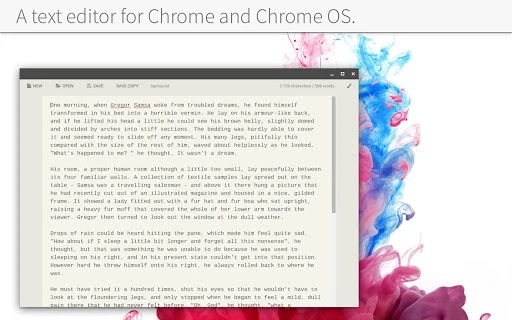
The user interface is minimal and focused on functionality, with a clean layout that prioritizes the text area. The top application bar includes basic controls and a settings menu accessible via [Ctrl] + [,]. The interface adapts well to small window sizes, making it suitable for use on Chromebooks with limited screen real estate.
Navigating between files and managing edits is straightforward. Users can open files by double-clicking in the file explorer or dragging them into the app window. The workflow is efficient for quick edits, especially when combined with keyboard shortcuts. The app responds promptly to input, and the text area scales dynamically with window width.
Performance observations are based on general software behavior patterns. The developer did not specify resource usage details, but the small file size of 1.5 MB suggests low CPU and RAM consumption. Stability appears consistent across updates, with bug fixes addressing issues related to file access and keyboard handling. No performance degradation has been reported in available changelogs.
Compatibility & System Requirements
Text Editor for Chrome OS is designed exclusively for Chrome OS devices. It runs as a web-based application within the Chrome Browser environment, requiring no installation process. The application is compatible with Chrome OS versions that support Chrome Apps, though specific version requirements were not listed.
The installation size is 1.5 MB, indicating a lightweight footprint ideal for devices with limited storage. Hardware requirements are not explicitly defined, but the app’s minimal design and low resource profile suggest it will operate smoothly on most Chrome OS devices, including budget models.
Exact system requirements were not listed. Compatibility information was partially provided. Users should ensure their Chrome OS device supports Chrome Apps and has sufficient storage space for the application and its data.
Pros and Cons
Pros
- Lightweight and fast startup
- Free to download and use
- Supports common file types including Markdown and JavaScript
- Customizable themes and font settings
- Keyboard shortcuts enhance productivity
- Offline mode available
- Settings sync across sessions
- Secure, ad-free, and free of bloatware
Cons
- Basic feature set—lacks advanced editing tools
- Minimalist design may not suit power users
- No auto-save or version history
- Tab key behavior is not fully undo-compatible
- Developer background not publicly available
- Updates appear infrequent
FAQ Section
Is the Text Editor for Chrome OS available for Windows or Mac?
The application is designed specifically for Chrome OS and runs as a Chrome App. It is not compatible with Windows or macOS unless accessed through a Chrome Browser on those platforms, but full functionality may be limited.
Can I use this app offline?
Yes, the app supports offline mode. The offline_enabled option in the manifest allows it to function without an internet connection.
Does the app save my work automatically?
The app does not include an auto-save feature. Users must manually save files using [Ctrl] + [S] or [Ctrl] + [Shift] + [S] to prevent data loss.
Are my settings saved between sessions?
Yes, user preferences such as theme, font size, and text width are synced and preserved across sessions.
Is the app secure and safe to use?
Yes, the app is free from ads, tracking, and bloatware. It operates within the Chrome OS sandbox environment, enhancing security. No third-party data collection has been reported.
Final Thoughts
Text Editor for Chrome OS delivers a reliable, no-nonsense solution for basic text editing on Chrome devices. Its minimalist design, keyboard shortcuts, and support for essential file types make it ideal for students, writers, and developers who need a fast, secure, and lightweight tool. While it lacks advanced features like auto-save or version control, its simplicity is its strength.
For users seeking a free, fast, and secure alternative to Notepad on Chrome OS, this app stands out. It’s particularly well-suited for quick edits, coding snippets, or Markdown writing without the complexity of full IDEs. Despite its basic nature, it offers thoughtful touches like theme customization and offline support.
Download Text Editor for Chrome OS now







